

I could give you the pure definition of a Software Engineer, but I don’t believe it will do it justice. As a profession that didn’t properly emerge until 40 years ago, I find it natural that it’s not well understood by most. Furthermore, it doesn’t manifest out in the wild so people can get a chance to observe the work being done. We have all seen a construction worker, a pharmacist, or a mechanic actively perform their duties, which removes much of the mystery. By contrast, software development usually happens behind closed doors. As you’ll see through my own adventure into this profession, it is an interesting intersection of art and applied sciences: the art comes from lots of writing (yes, similar to authors writing a book) and the applied sciences involve things like math, logic, physics, and more to instruct a computer to execute real-world tasks.
First encounter with computing
I grew up with close to zero exposure to programming. Hats off to the Lebanese educational system for its generous offering of a single class in high school that barely scratched the surface of anything resembling programming or computing. My only experience tinkering with computers prior to this was doing simple repairs by opening by parents’ desktop computer, upgrading the RAM memory on it, and for some reason reinstalling Windows too many times. For the majority of my childhood, access to the Internet was very spotty as it was mostly through dial-up. This was also expensive and kept our home phone line busy, so acquiring knowledge through the Internet wasn’t really a thing for me back then.
All that to say that the computing class in high school felt like a novelty that came out of nowhere: it was an HTML & CSS class that taught the basics of creating simple webpages and prettifying them. I was instantly hooked. All the sudden, something that always felt like a mysterious black box became a bit clearer. This was indeed the first clue to understanding what software development involves: you write a bunch of text that adheres to specific syntax and guidelines, and that results in a functional user interface that anyone can use.
While the majority of my classmates didn’t take this class seriously, it was one I looked forward to every week. To be fair, this class had no exams and wasn’t part of the Lebanese Baccalaureate curriculum, so it was natural for most to focus on sciences and humanities as they represented the vast majority of our grades. However, this class along with my general interest in electronics, planted the seed for me to seek a major in university that involved computing. My parents were pushing me for years to pursue medicine or pharmacy, so they were skeptical at first, but ended up realizing that I’m more likely to succeed if I study something I actually like.
Science or Engineering?
Back in the days of MSN Messenger, I used to chat with an uncle who lived in Canada every now and then. Knowing that he specialized in computer science, I asked for his advice, and he told me about a newer program in universities called “Software Engineering”. Up until that point, I hadn’t realized that computing could intersect with engineering; I liked the idea a lot because I was drawn to mathematics and physics in school, which tend to be a good basis for engineering in general. As the program was relatively new, not many universities in Lebanon offered it, but I still applied to the few that did. Moreover, after spending a month in Canada, I decided to also apply to the University of Ottawa as it offered the program as well. Due to Lebanon’s political turbulence and security instability, my family and I made the decision that I would have better opportunities abroad. Canada became the #1 choice.
I ended up applying to both Computer Science and Software Engineering to give myself the opportunity to choose whichever I’m accepted into. I spent some time researching the difference between the two, which helped me come to the following conclusions:
- Computer Science is more theoretical and tends to focus on the development and understanding of complex algorithms. The word science in it is very representative of its research nature, as it tends to go deep in specific subject matters.
- Software Engineering on the other hand is the practical application of Computer Science. It encompasses a process that involves designing, building, testing, and maintaining software systems. It carries the word engineering because it is typical to follow established engineering principles to build robust and maintainable systems that can be safely used by the public. This is akin to building a bridge or a building, but from a less tangible perspective.
I ultimately decided to go with Software Engineering due to the practical nature that resonated more with me. I was also biased by the buzz around that profession back then, often being described as one of the best jobs. Additionally, it was a gut feeling, which is something I’ve learned to follow when it comes to some close decisions like this.
With that said, I want to emphasize that through my years of experience, I’ve come to understand that pursuing either of these fields will likely lead to similar opportunities in the job market; computer scientists can still develop end-to-end software, and software engineers can write complex algorithms from scratch. The difference was mostly in the academic setting where software engineering exposed students to topics like engineering ethics and different processes of software development (such as gathering requirements from clients). Computer science focused more heavily on algorithms and data structures.
What coding really means
I remember my journey through university starting with huge imposter syndrome. Outside of my basic high school class, I had never written a line of code, nor did I properly understand the principles behind it. Right from the get-go, it was obvious that a lot of students in software engineering had some prior experience in coding; from the questions they asked in class, to things I saw on their computer screens, or even from conversations I’ve had with some, it became clear to me that coding was not a new thing for them. At the same time, I did notice that some others were in a similar spot as me, which eased my worries slightly.
The first class that properly introduced me to programming was a Java class in my first semester. For the first time, I learned that there is a dedicated piece of software that you can install on your computer, called an IDE (Integrated Development Environment), that is meant to assist you with writing code. While it won’t write it for you, it will help you with the syntax, can compile (more on that in a bit) and run the code for you, as well as provide other useful utilities to ensure your code’s health and correctness.
While the concepts we learned were pretty basic, I finally started understanding how coding leads to a functional piece of software that people can use. The first step is usually writing the code itself in one of the available programming languages. While an IDE will help make this faster, code can technically be written with a simple text editor like TextEdit or Notepad. Each programming language has its own set of rules, syntax, and keywords that signify some sorts of instructions, so it’s a matter of putting together the right combination of words. Just like the right combination of words produces a valid sentence, the right combination of code makes a small part of a functioning software application. You put a number of sentences together and you get paragraphs, which make up chapters, which make up a book. Programming works similarly where you are trying to combine different pieces of code together to make modules, which are building blocks of the final software application.
Let’s get our hands dirty
As elegant as theory can be, its abstract nature only gets us so far. I couldn’t resist the urge to share a practical example to illustrate what I just went over. After all, there’s a difference between telling you the cake is made and showing you how I make it. Even if you’re a seasoned developer, I hope you can appreciate my attempt to go back to the basics!
I’m going to use an example in Java that anyone can follow. A common first task when learning a new programming language is to display “Hello, World!” so I’m going to honour this.
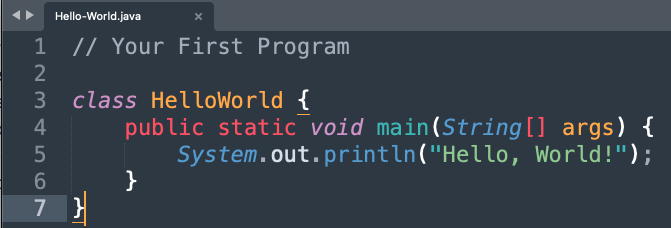
Let’s break that down line by line:
- Line 1 is a code comment. It is common to use this to annotate code to help readers understand what’s going on. It can be particularly useful around very complex code to explain in plain English what the author is attempting to do. It’s equivalent to a note sticky in a book.
- Line 3 is what’s called a class in Java. Think of it as the chapter in our book analogy: just like a book chapter serves to encapsulate a cohesive set of information on a subtopic within the broader subject, the class encapsulates specific functionality within a software system.
- Line 4 is Java’s way to declare the beginning of a function. This is analogous to a paragraph in a book: everything within it is meant to address a very specific idea. Code that’s inside a single function would ideally execute a single focused task.
- Finally, line 5 is the actual instruction that displays “Hello, World!” to the user.
Everything surrounding line 5 serves the purpose of organizing the code, which becomes crucial as the application grows. Imagine reading an entire book that’s composed of a single block of text! You wouldn’t be able to refer to a quote by saying “the first sentence of the last paragraph on page 42” or “the intro to chapter 7”. Moreover, in programming, bits of code often refer to each other, so they need a way to call one another. Classes and functions are a common way to enable this.
Once code is written, it often needs to be “compiled” before it can be executed. This means transforming it from the above semi-readable English words into a set of instructions made up of 0’s and 1’s that the computer’s processor can directly understand and execute. The way this process occurs differs from a programming language to another, and can sometimes consist of more than one step. There are even some languages, called interpreted languages, that are executed directly without a compilation step. In order to compile code, we utilize a sophisticated piece of software that usually comes bundled with the IDE or can be installed separated. It’s called the “compiler”.
To sum it all up, here’s what you would do to run the Hello World code above from the command line.

The first instruction javac HelloWorld.java asks the Java compiler to compile the code. The second instruction java HelloWorld runs the machine code that was generated by the compiler. And voilà! This gets “Hello, World!” to be displayed right underneath it.
If my memory serves well, this was one of our first tasks in my Java class. While this is literally the simplest thing to program, I remember feeling joy from visualizing a result and getting the computer to produce what I have in mind. This process is the bread and butter of software development, as we spend countless hours transforming something we can see in our minds or through designs into an actual software program that runs and can be interacted with. If this is all new to you and you’ve never programmed in your life, take five to try the steps above by yourself and see how that makes you feel (you might need to install Java first).
Beyond the code
As I mentioned earlier, the coding example from above is as simple as they come. When building real-world software applications, the code you write is much more complex. We often resort to geometry and algebra to layout components on a screen that’s represented as a coordinate system, and calculate distances between those components. Some domains like video game development and graphics use physics principles like kinematics and dynamics to simulate movement. And the list goes on depending on the problem the software application is trying to solve. In all cases, code authors always rely on computational logic in order to come up with the specific steps the application needs to execute to achieve its goal. Think of it as trying to speak the computer’s language to give instructions that produce the result of whatever requirement you have in mind. I hope this side of things helps you see the scientific side of developing code, aside from the art of writing it.
With that being said, I want to stress that coding isn’t the only thing software engineers do, but it’s pretty central to our craft. There’s a lot of process and activities that get us from an idea to a functioning app in the hands of users, but it’s always code that actually backs every piece of software you use, including the browser helping you read these words right now.
Allow me to illustrate this by using another example. When a bridge needs to be built, there are several steps to it. From a broad perspective, these are the fundamental stages typically undertaken:
- Some amount of time is spent figuring out what the bridge needs to look like, how wide and tall it needs to be, what material to use.
- One or more architects figure out what the supports look like, where the stay cables and pylons go, and so on. A set of designs for the bridge are produced to visualize this.
- Once the planning, scoping, and designing is done, tangible materials like concrete and steel are used to physically bring the bridge into existence.
- And finally, before the bridge is open to the public, extensive testing and inspections are conducted on the built product.
Developing software is a very similar process. In fact, we have formal names for each one of those 4 steps:
- Requirement gathering (or planning).
- Software design.
- Implementation (or coding).
- Testing & deployment.
As you can see, coding is only one of the stages of this engineering practice, but just like the construction materials for the bridge, it’s the most tangible element of the software application.
I’ll admit that the steps above aren’t meant to be followed religiously for every single task. Depending on what needs to be done, we often borrow a bit of each step to achieve the intended outcome. In addition to this, there are plenty of other activities during software development that aren’t covered by those steps. For example, fixing a bug doesn’t necessarily follow the same mental model as building something new. Just like fixing a pothole on the bridge isn’t the same as building a sidewalk on it.
I will probably go into these other activities in more depth in future posts, but for now, I hope this helped you better understand what coding is about, or maybe helped you see it in a new perspective.

 Inside The Mind Of An Engineer
Leave a reply to Ben Cotte Cancel reply